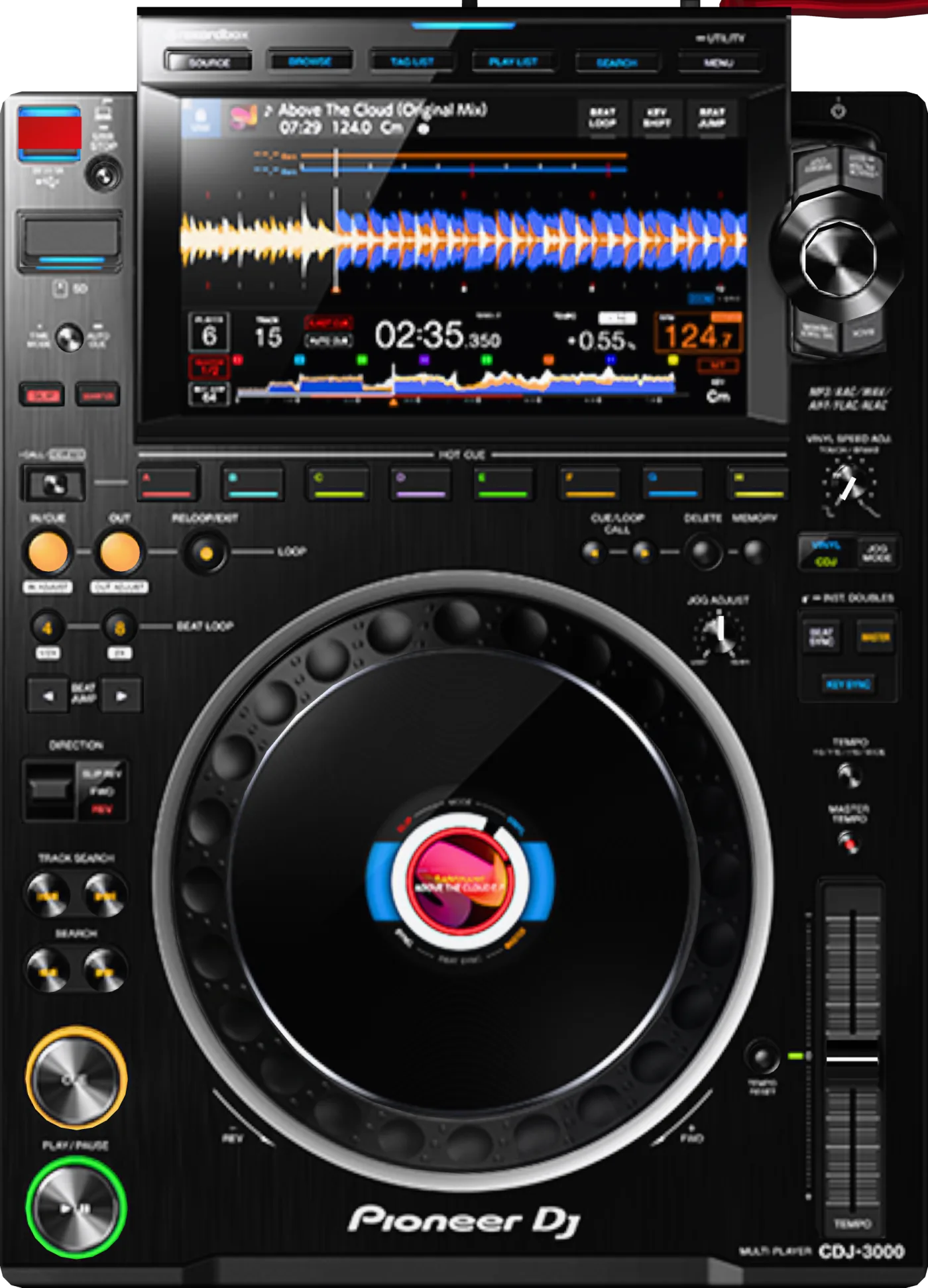
Touch displayTouch screen
9-inch touch screen: track list, waveform, BPM, key, time and a countdown in bars to the next cue.
You scroll and load tracks with a tap, and while playing you watch the waveform and count the bars to the spot you need. Tapping the overview waveform while paused moves playback to that point.
Mentor tip: Don't just look at BPM: if the key shows green, the track is a harmonic match for the track on the master player.
SOURCE / BROWSE / TAG LIST / PLAYLIST / SEARCH / MENU/UTILITYNavigation buttons
Switch the screen: SOURCE picks the media, BROWSE shows categories and folders, TAG LIST shows the tracks you set aside, PLAYLIST shows playlists, SEARCH finds tracks. Hold MENU/UTILITY to open the player settings.
Before your set, press SOURCE and pick your USB stick, then work from PLAYLIST — that's where everything you prepared in rekordbox lives.
Mentor tip: Build your playlists at home: in the club there's no time to dig through a folder called “New (3)”.
Rotary selector / BACKRotary selector and BACK
Turn the rotary selector to move the cursor through the list; press it to open a folder or load a track. BACK goes up one level (hold it to jump to the top).
Turn to pick a track, press to load it. On the waveform screen, holding the rotary selector switches between waveform zoom and beatgrid adjustment.
Mentor tip: Never load a track onto the player that's on air: first make sure its channel on the mixer is closed.
TAG TRACK/REMOVETag a track
Adds the selected track to the TAG LIST — a short “play later” list (up to 100 tracks per media). Hold to remove a track from the list.
While one track plays, tag 3–5 candidates for the next one, then choose from that short list instead of your whole library.
Mentor tip: Other players on the PRO DJ LINK network can see your Tag List — handy for suggesting a track to your partner in a B2B.
TRACK FILTER/EDITTrack filter
Narrows the track list by BPM (a range of up to 6%), compatible key, rating, color or rekordbox My Tag. Hold to set the filter conditions.
In the settings, press MASTER PLAYER — the filter takes the BPM and key of the playing track, and only matching tracks stay in the list.
Mentor tip: The filter only works with a rekordbox library — one more reason to export your USB stick properly.
SHORTCUTQuick settings
Opens the quick settings screen: Beat Jump and Quantize step, hot cue auto load, waveform color, brightness, and saving and loading My Settings.
When you get to the club, use SHORTCUT to load your own settings from your USB stick (MY SETTINGS LOAD), and the player behaves just like at home.
Mentor tip: The 3 BAND waveform color shows lows, mids and highs in different colors — it's easier to see where the kick is and where the vocal is.
USB / SD / USB STOPUSB port, SD slot and USB STOP
This is where you insert a USB stick or SD card with tracks exported from rekordbox. The USB STOP button safely disconnects the USB stick.
When your set is over, hold USB STOP until the indicator stops flashing, and only then pull out the stick.
Mentor tip: Always carry two USB sticks with the same export: sticks fail at the worst possible moment.